
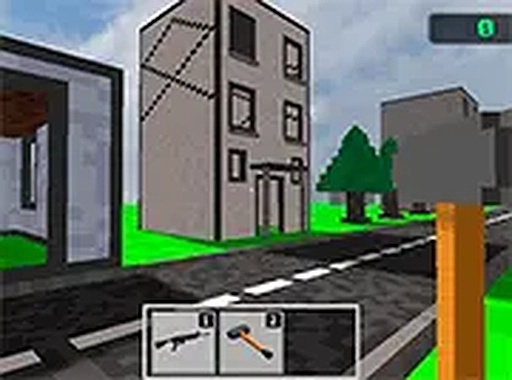
Construct & Physics Playground
Opens in a play window — no download required.
Reviews
Construct & Physics Playground offers a satisfying, stress-free experience. The realistic physics engine makes each tool interaction feel impactful, and the three unique locations provide plenty of variety. It is a perfect way to unwind and experiment creatively.
Description
Game Introduction
Construct & Physics Playground is a browser-based sandbox experience that lets you explore the cause and effect of physical interactions. The game places you in a virtual space with three distinct environments, each containing various structures. Your main activity is to use a set of tools to interact with these structures, observing how they react according to realistic physics. The core appeal is the satisfying feedback from the physics engine, making each action feel impactful. This game is designed as a creative and relaxing activity, allowing you to experiment freely without any pressure. It is accessible to anyone with a web browser, as no downloads or installations are required. The experience combines elements of creativity and problem-solving, as you can decide how to approach each location and which tools to use for different outcomes.
How to Play
To play, you use standard mouse and keyboard controls to move through the game world. From a selection of tools, you choose one to interact with the structures around you. You aim at different parts of a building or object and click to apply the tool's effect. The physics engine then calculates the result, causing structures to collapse or react in various ways. You can explore all three locations at your own pace, experimenting with different approaches. For a more immersive experience, playing in full-screen mode is recommended. The game runs entirely in your browser, so no installation is needed.
Game Features
Construct & Physics Playground includes a realistic physics engine that simulates how structures behave under force. There are three unique locations to explore, each with its own set of structures and layouts. Players have access to a variety of tools, including a hammer and a blaster, each offering a different way to interact with the environment. The game is free to play and runs directly in a browser, with no downloads or installations required. It also supports full-screen mode for a more engaging experience.
Tips for Success
To get the most out of the game, try using different tools to see how they affect various structures. Explore all three locations to find the most interesting setups. Using full-screen mode can enhance your view and make interactions more precise. Experiment with aiming at different parts of a building to see varied physics reactions. Practice your timing and aim to achieve the desired results.







Comments
Sign in to leave a note
You must be logged in before posting a review or rating.
No account? Create one
No comments yet. Be the first to comment!