Idle Slime Adventure
Reviews
💡IF2 Idle Slime Adventure offers a relaxing idle experience with a humorous slime theme. The upgrade system is rewarding, and the variety of slimes keeps gameplay interesting. Easy to pick up and play, it is a great choice for casual gamers looking for a fun way to unwind.
Description
Game Introduction
IF2 Idle Slime Adventure is a sidescrolling idle management game where players guide a hero through hordes of mischievous slimes. These slimes are not evil but enjoy getting on your boots and making your socks wet. As you progress, you will encounter different slime variations with unique behaviors. The ultimate goal is to reach the Titan Gods by upgrading your hero and managing your adventures. The game combines idle mechanics with strategic upgrades, offering a relaxing yet engaging experience for all ages.
How to Play
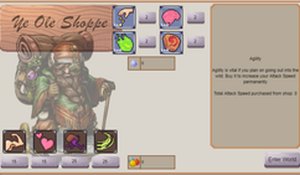
In IF2, gameplay is simple and intuitive. Use your mouse to click on options to upgrade your hero's abilities and equipment. Start adventures by selecting from available quests, each offering unique challenges and rewards. During encounters, activate skills by clicking on them to help your hero overcome slimes more efficiently. The idle management aspect means your hero continues to earn resources even when you are away, allowing you to progress at your own pace. Focus on upgrading wisely to overcome tougher slimes and reach the Titan Gods.
Game Features
IF2 offers a unique idle management experience with a humorous slime theme, easy click-based controls, and a satisfying hero upgrade system. Each slime type has distinct behaviors, and the Titan Gods present a grand goal. The game rewards strategic planning and patience. The incremental progression system means your hero becomes stronger over time, and the running aspect adds a dynamic element to the adventure.
Tips for Success
To succeed in IF2, prioritize upgrading your hero's core abilities early on. Balance your resource spending between equipment and skills to maximize efficiency. Take advantage of idle earnings by checking in regularly to reinvest your gains. Experiment with different quests to find the best rewards for your current level. Patience is key—consistent small upgrades lead to significant progress over time.
Compatibility
Faq
Is IF2 Idle Slime Adventure free to play?
Can I play IF2 on mobile devices?
Does IF2 require an internet connection?
How long does it take to reach the Titan Gods?
Are there any in-app purchases in IF2?
Can I save my progress in IF2?
Related Picks

Mage Arena Battle Royale

Your Chronicle: Story Adventure

Copy Center Tycoon: Idle Business
Space Repair Puzzle

Armyclash Online Strategy Game

Chance Knight Strategy Game

Carnival Inflator Clicker Game